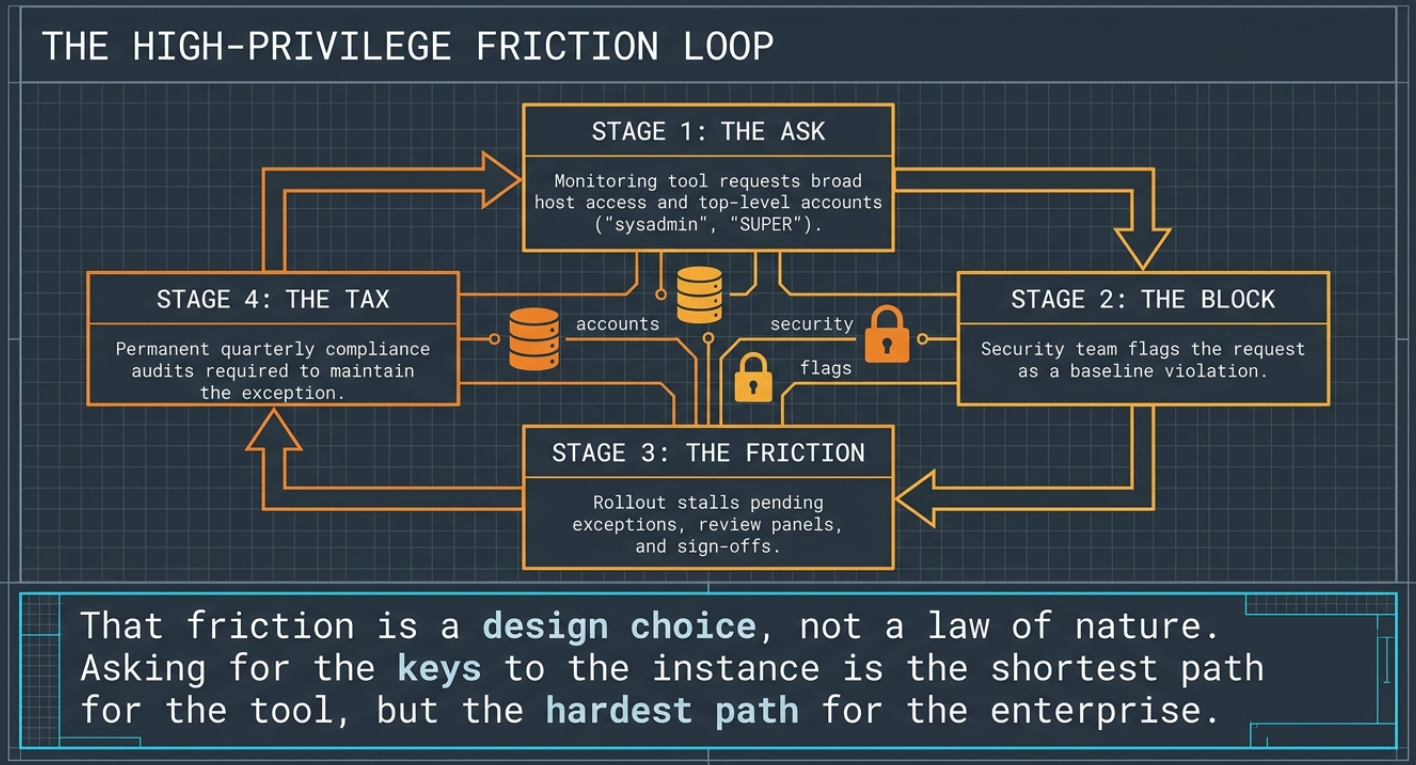
Every database monitoring tool eventually meets the security team, and the conversation usually goes the same way. The tool wants an account with broad privileges, sometimes the keys to the whole instance, because that is the shortest path to making everything work. Often it wants to be installed on the database server too. And the security team, correctly, says no, or says yes slowly, with a review, an exception, and a quarterly audit attached.
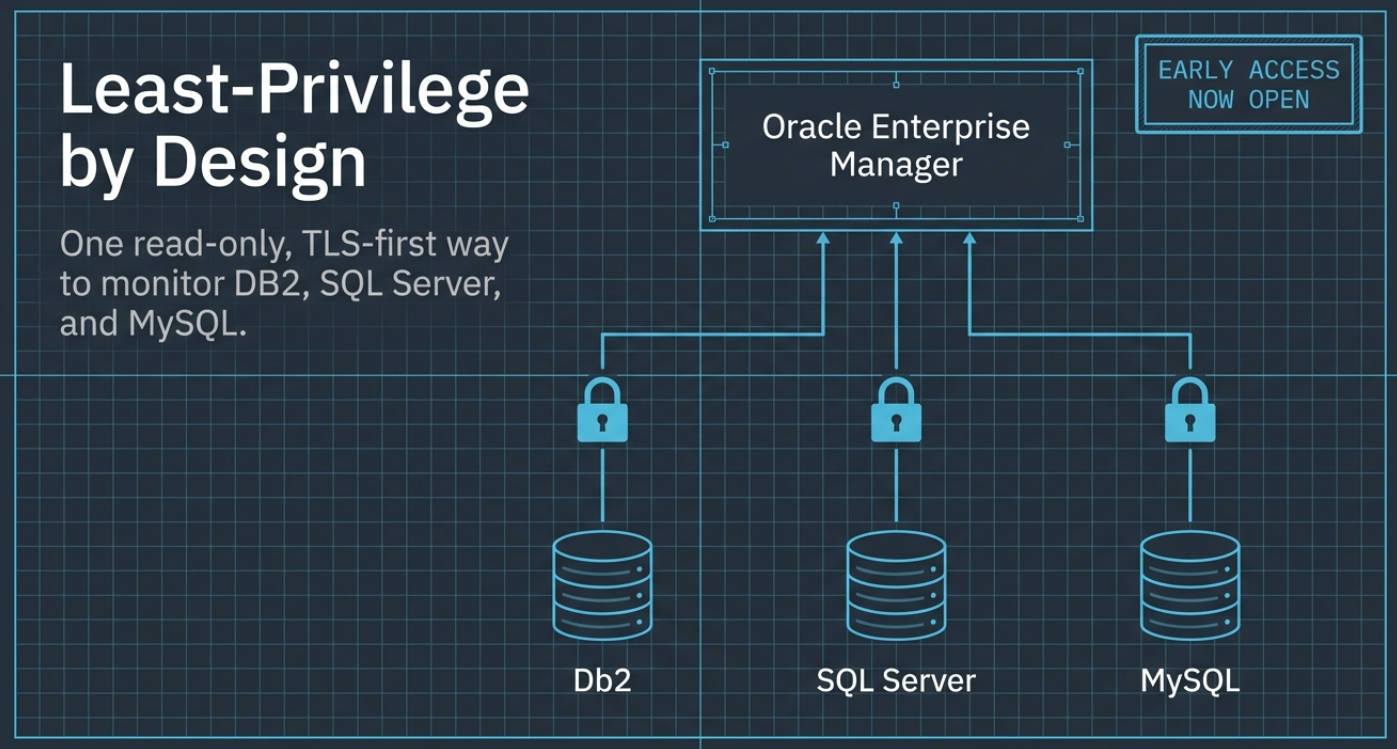
That friction is a design choice, not a law of nature. Across the three plug-ins in this series (DB2, Microsoft SQL Server, and MySQL), Integration Plumbers made the opposite choice deliberately, and made the same one three times. A read-only grant per database, nothing above it. An encrypted connection by default. Collection that runs from wherever you put the agent, with no proprietary daemon installed on the database host. The heavy lifting done back in the Oracle Enterprise Manager repository, not on your production server.
This is the post that ties the series together, because the design is the product as much as any single feature is. Three parts: the least-privilege grant, the connection (TLS-first, deployed your way), and why this design reaches the cloud as easily as the rack in your data center.
1. One least-privilege grant, per database
The plug-ins ask for the smallest standing privilege each engine offers for reading monitoring data, and nothing more.
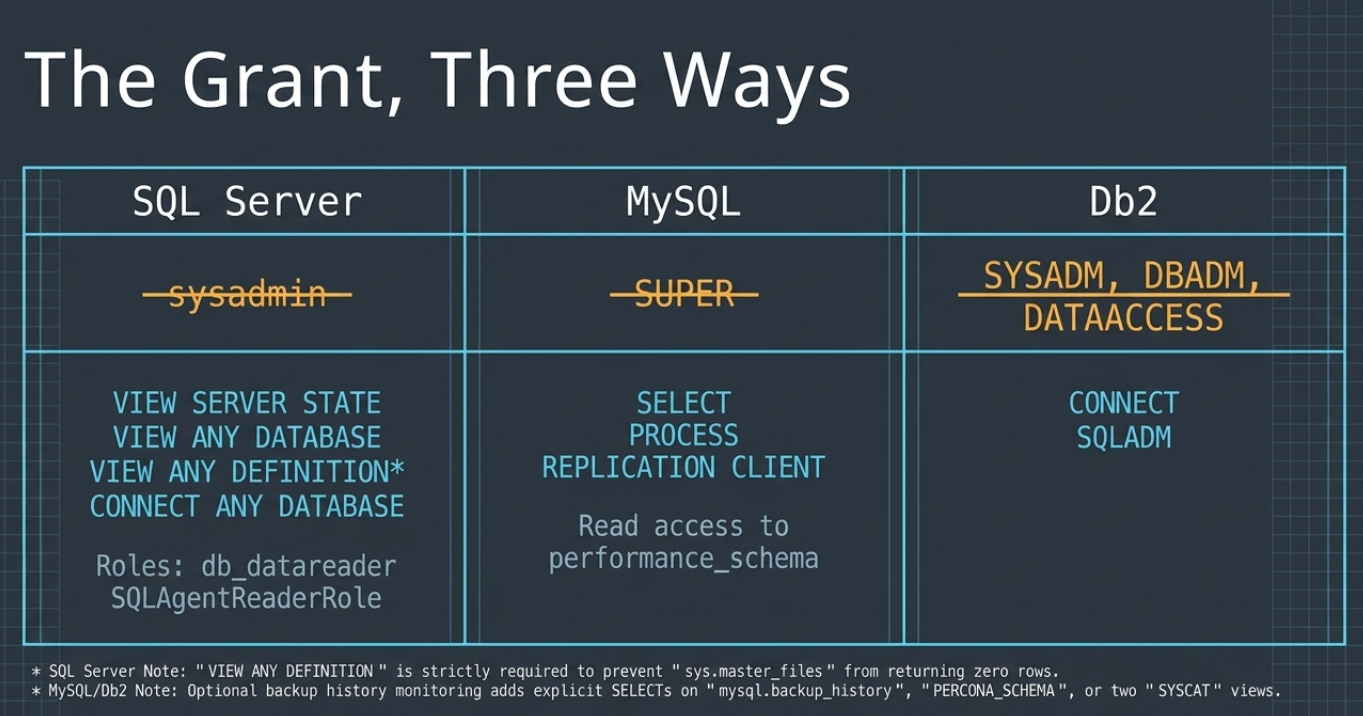
SQL Server collects through a login holding four server-level read permissions plus two read-only msdb roles. Every one of them is read-only metadata. None of them is sysadmin, db_owner, or CONTROL SERVER.
-- Server level: read-only, no sysadmin, no CONTROL SERVER
GRANT VIEW SERVER STATE    TO [em_monitoring];  -- the DMVs: host, CPU, memory, HADR, FCI
GRANT VIEW ANY DATABASE    TO [em_monitoring];  -- list every database in sys.databases
GRANT VIEW ANY DEFINITION  TO [em_monitoring];  -- sys.master_files; metadata visibility only
GRANT CONNECT ANY DATABASE TO [em_monitoring];  -- reach each database in the file-group sweep

-- msdb: backup and job history
ALTER ROLE [db_datareader]      ADD MEMBER [em_monitoring];
ALTER ROLE [SQLAgentReaderRole] ADD MEMBER [em_monitoring];
Two of those deserve a note, because a security reviewer will ask. VIEW ANY DEFINITION is needed for one specific reason: sys.master_files is permission-filtered and returns zero rows without it, which leaves the database-file metrics permanently empty. It grants metadata visibility and nothing else, though it does widen catalog visibility as a side effect: the login will see all server principals rather than only its own. CONNECT ANY DATABASE lets the cross-database sweep reach every database; the sweep filters on HAS_DBACCESS, so anything it cannot reach is skipped rather than erroring.
MySQL uses a read-only account with SELECT, PROCESS, and REPLICATION CLIENT. No SUPER.
GRANT SELECT, PROCESS, REPLICATION CLIENT ON *.* TO 'em_monitoring'@'%';Db2 needs CONNECT and SQLADM. Not SYSADM, not DBADM.
GRANT CONNECT ON DATABASE TO USER em_monitoring;
GRANT SQLADM ON DATABASE TO USER em_monitoring;
Each of these is built to the vendor's documented minimum for what the plug-in collects, rather than read off a manual or a convenience default. The MySQL set has been certified against a live instance: an account holding only those grants read the performance counters, the replication state, the backup history, and the query workload with zero permission errors and no elevated rights, and every write it attempted was rejected. Whichever engine you are reviewing, that is the test worth repeating on your own instance: the login should fail any INSERT, UPDATE, EXEC, or ALTER you try with it.
Two features are worth a note, and both stay read-only. MySQL backup monitoring reads its history from wherever your backup tool wrote it: mysql.backup_history for MySQL Enterprise Backup, PERCONA_SCHEMA for XtraBackup. The global SELECT above already covers both, so neither needs a grant of its own. If you scope the monitoring account to named schemas rather than *.*, include those two; without read access the plug-in reports the tool as not detected rather than raising a false alarm. And Db2's audit-posture collection reads two SYSCAT catalog views that are readable by PUBLIC in a default installation, so it needs nothing extra there either. On an installation hardened to a security baseline that has revoked PUBLIC from them, grant the monitoring user explicit read on those two views. Neither case reaches for an authority level.
It is worth saying plainly what this replaces. Plenty of legacy monitoring tools and plug-ins ask for the powerful account by default, because a top-level login is the shortest path to making every feature work: sysadmin on SQL Server, SUPER on MySQL, SYSADM on Db2. Some go further and expect shell-execution features to be enabled so that administrative actions can shell out to the operating system. Those are the requests that turn a monitoring rollout into a compliance conversation, because they are exactly what a security baseline is written to prevent.
If you are evaluating anything in this space, that is the question worth asking early: what standing privilege does it hold, and does any part of it need a feature your baseline turns off? The answer determines whether your rollout needs an exception, and exceptions are the part that never really goes away.
A read-only grant sidesteps all of it. It is the kind of request a security reviewer can approve in a single sitting, and there is no standing exception to re-justify at the next audit.
Worth noting for the SQL Server case specifically: treating VIEW SERVER STATE as the least-privilege way to read the DMVs is Microsoft's own documented guidance. This is not a novel interpretation, just a decision to build against the documented minimum instead of the convenient maximum.
2. TLS-first, and deployed on your terms
Two more decisions follow from the same principle.
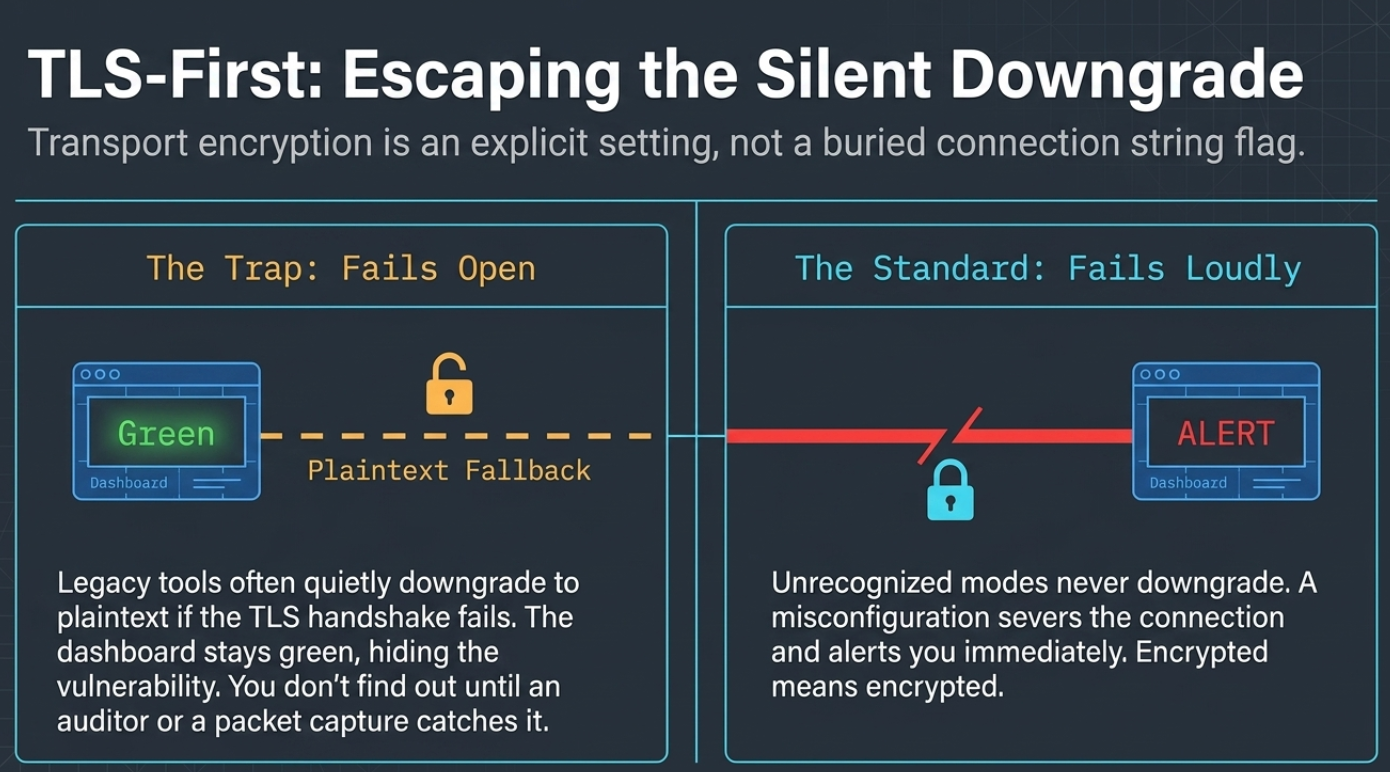
The connection is encrypted, on purpose, without a trap. A recurring problem in older tooling is the encryption setting that quietly does nothing: the option that says "secure" but silently falls back to plaintext if the handshake does not go perfectly, or the one that makes you hand-edit a connection URL to turn TLS on at all. The plug-ins treat transport security as a first-class, explicit setting, so "encrypted" means encrypted and a misconfiguration fails loudly instead of downgrading in silence.
That distinction matters more than it sounds. A silent downgrade is the worst possible failure mode for a security control, because the dashboard still turns green. You do not find out from the tool. You find out from a packet capture, or from an auditor, or from an incident.
You choose where collection runs. The plug-ins collect over a standard database connection from an Oracle EM agent, and you decide where that agent lives: a local agent close to the database, or a remote agent that reaches it over the network with nothing proprietary installed on the database host.
The remote option is the one that changes the shape of a rollout. Deploying to every database host means a change window, a package, and a patching plan per server, multiplied across the estate and repeated at every upgrade. Deploying a remote agent means a firewall rule and a grant.
Here is the honest boundary. Metric collection gives up nothing remotely. Every metric family collects over JDBC, so performance, availability, storage, locks, replication and HADR state, backup history, and top-SQL all work identically whether the agent sits on the database host or across the network. That is the mode the plug-ins were designed around, not a fallback.
What does need a local agent is a specific, optional set of actions rather than collection. On Db2, the administrative jobs and the local diagnostic-log scan work through the database's own command-line tooling and its on-host log file, so they need an agent on the database host and a host credential to run as. That constraint comes from how those operations work rather than from anything in the rebuild, and it is worth knowing before you plan a remote-only rollout. If those actions matter to you, put the agent local. If monitoring is what you need, remote costs you nothing. The deployment guide covers the specifics for each engine.
3. Why this design reaches the cloud
Here is the payoff, and the reason the three plug-ins share a spine.
When you move a database to a managed cloud service (RDS, Aurora, Azure SQL Managed Instance, Cloud SQL), two things become true at once. You cannot put anything on the host, because there is no host you are allowed to touch. And you cannot have the powerful account, because the cloud provider keeps that for itself and hands you a capped administrative role instead.
A tool that depends on a resident agent on the host and a high-privilege login has to be partly rebuilt for that world. A tool that can already run from a remote agent on a read-only grant does not, because the read-only grant is exactly the one these platforms let you create, and a remote agent never needed the host in the first place. The same design that is least-privilege and polite on-prem is the one that simply works where you have the least access.
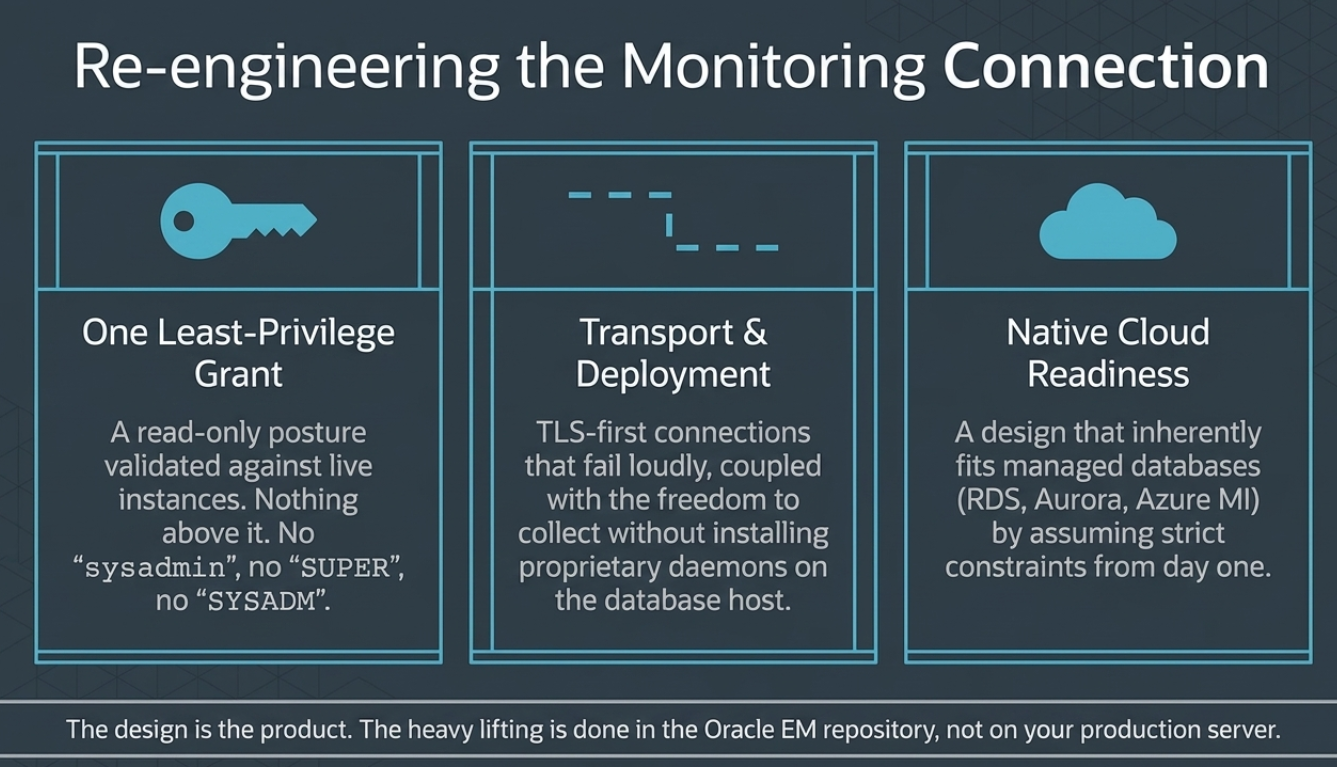
There is a second structural advantage underneath it. The analysis that has to reason across more than one instance happens back where the data is already aggregated, not on the database host: query-history trending, storage growth projected out to a days-to-full number, and composite cluster and DR-readiness scores. A tool that does its computing inside a per-host agent only ever sees one host, so estate-wide answers have to be reassembled somewhere else, and on a managed cloud database that in-agent computation cannot run at all.
The guiding principle is to compute wherever the answer comes out truest. Sometimes that means asking a database's own tooling directly rather than reconstructing its verdict from metrics, and taking the reconstruction as the fallback. Sometimes it means doing the work centrally because no single host can see enough. What you get either way is an answer you can trust without having installed anything on the database to produce it.
A word on sequencing, because the design and the calendar are different questions.
Managed cloud was a design target from the start, not something being retrofitted. Every metric family collects over JDBC from an agent that can sit anywhere, against a read-only grant these platforms are happy to issue, which is why a managed endpoint is an address change rather than an architecture change. You can point the plug-ins at RDS, Aurora, Cloud SQL, or Azure Managed Instance today by adding the target with its endpoint and credentials.
Early Access is on-prem first across all three plug-ins, and full cloud certification across those platforms is targeted for general release. Certification here means what it should mean: running each plug-in against each real endpoint, confirming the matrix, and standing behind it. That work is scheduled rather than speculative, and the product page for each engine carries the current platform status if you are planning a specific rollout.
The security model does not change when the database moves to the cloud. Only the address does.
Wrapping up
Across Db2, SQL Server, and MySQL, the features differ because the databases differ. The posture does not. A read-only grant a security team can approve in a sitting, with nothing above it to justify. An encrypted connection that will not quietly downgrade. The freedom to collect without installing anything on your database host. And the cross-instance analysis done in the console you already run, which is also the only place it can be done across a whole estate at once.
That is the through-line of the whole series. The backup history, the DR-readiness math, the query workload you can look back on: every one of them is built on a foundation that asks your databases for as little as possible. Monitoring should not cost you a security exception. Designed right, it does not.
We covered the least-privilege grant, the TLS-first connection you can deploy your way, and why that design reaches the cloud as naturally as the data center.
This is the sixth post in a series on the blind spots your estate monitoring leaves across MySQL, SQL Server, and DB2. The earlier five were The Backup You Can't See, on whether last night's backup actually succeeded; The DR-Readiness Gap, on whether a "synchronized" cluster could really fail over without losing data; The Clock Ran Out on SQL Server 2016, on monitoring through an end-of-support migration; After MEM, on continuity for MySQL monitoring; and No Cliff, No Drama, on monitoring DB2 11.5 and 12.1 and the new ground ahead.
Everything the Oracle plug-ins do, rebuilt for the versions you actually run, plus the things they never did: watch your backups, remember your query history, tell you the truth about cluster health, and ask your databases for almost nothing to do it.
Early Access opened on 31 July 2026 and the least-privilege, TLS-first approach runs under all three plug-ins for Oracle Enterprise Manager. Learn more and sign up:
- DB2 → integrationplumbers.io/db2-plugin
- Microsoft SQL Server → integrationplumbers.io/mssql-plugin
- MySQL → integrationplumbers.io/mysql-plugin
If you would rather walk through the grant with your security team before signing up, talk to us. The whole point of a read-only design is that the review is short.
What exactly does the monitoring account need on each database?+
On SQL Server, four server-level read permissions (VIEW SERVER STATE, VIEW ANY DATABASE, VIEW ANY DEFINITION, CONNECT ANY DATABASE) plus the db_datareader and SQLAgentReaderRole roles in msdb. On MySQL, an account with SELECT, PROCESS, and REPLICATION CLIENT, granted globally on *.*. On Db2, CONNECT and SQLADM. That is the whole standing privilege for core collection in each case: no sysadmin, no SUPER, no SYSADM or DBADM, and no operating-system account for the monitoring user. On MySQL the global SELECT is also what makes the backup-history tables readable without a further grant. One optional feature adds a read-only grant on a Db2 installation hardened away from its defaults, noted below. Each set is built to the vendor's documented minimum, and the MySQL set has been certified against a live instance rather than inferred from documentation.
Do the plug-ins require xp_cmdshell on SQL Server?+
No, and not just for collection. The backup and restore jobs avoid it too, by design: they issue native T-SQL BACKUP and RESTORE to a disk file rather than shelling out. It is worth checking the same question against whatever you run today, because some legacy tooling expects shell execution to be enabled before its administrative actions will work. That feature lets the database engine run operating-system commands, which is why security baselines flag it and most teams keep it off. Reading backup history does not need it either: the data lives in msdb.dbo.backupset and is reachable with an ordinary read-only query.
Do I have to install an agent on my database server?+
Not for monitoring. Collection runs from an Oracle Enterprise Manager agent and you choose where that agent lives, including a remote agent that reaches the database over the network with nothing installed on the database host. Because every metric family collects over JDBC, remote collection is not a reduced-capability fallback: performance, availability, storage, locks, replication and HADR state, backup history, and top-SQL all behave identically either way. The exception is a set of optional actions rather than collection. On Db2, the administrative jobs and the local diagnostic-log scan work through the database's own command-line tooling and its on-host log file, so those need an agent on the database host and a host credential to run as. Decide based on whether you want those actions; monitoring alone costs nothing remotely. The deployment guide has the per-engine detail.
What does TLS-first actually mean here?+
That transport encryption is an explicit setting rather than an optional flag buried in a connection string, and that a misconfiguration fails loudly instead of falling back to plaintext. The failure mode being avoided is the silent downgrade, where a tool reports a healthy connection while sending credentials and query text in the clear. That is worse than encryption being visibly off, because nothing in the console tells you. You find out from a packet capture or an auditor.
Will this work on RDS, Aurora, or Azure SQL Managed Instance?+
Yes, and it was designed for exactly that. Managed services remove two things, host access and the top-level administrative role, and a remote-agent design collecting over JDBC on a read-only grant never depended on either. In practice that means you add the target by endpoint and credentials rather than discovering it from a host process, and collection behaves the way it does on-prem. Early Access is on-prem first across all three plug-ins, with full certification across RDS, Aurora, Cloud SQL, and Azure Managed Instance targeted for general release. If you are planning a rollout on a specific platform, the product page for that engine carries the current status.
Why does it matter where the computation happens?+
Because it determines what can be computed at all. Anything that has to reason across more than one instance is done centrally, where metrics from every monitored target are already aggregated: query-history trending, storage growth projected to a days-to-full number, and composite cluster and DR-readiness scores. A tool that computes inside a per-host agent only ever sees one host, so estate-wide answers have to be reassembled somewhere else, and on a managed cloud database that in-agent computation cannot run at all. The rule is not absolute, though. The aim is to compute wherever the answer comes out truest, which sometimes means asking a database's own tooling for its verdict rather than reconstructing one, and keeping the reconstruction as the fallback.
How is this different from just creating a read-only user for an existing tool?+
A read-only user only helps if the tool can actually work with one. Most monitoring tools ask for broad privileges because some feature in them genuinely needs it, so restricting the account means losing collection, hitting permission errors, or maintaining a documented exception. The difference here is that the least-privilege grant is the design target rather than a configuration you harden into afterward: the collection was built against the documented minimum for each engine and validated at that level, so there is no feature waiting behind a privilege you did not grant.